

Key Takeaways
- The declarations page summarizes your entire policy — coverage types, limits, deductibles, and premium — on one or two pages.
- Key items to verify include named insureds, policy period dates, coverage limits, and listed exclusions.
- Errors on a declarations page — wrong address, missing drivers, wrong coverage amounts — can affect a claim outcome.
- The declarations page is not the full policy; exclusions and conditions appear in the policy document itself.
- Review your declarations page every renewal period, not just when you first purchase a policy.
What you will need
What a Declarations Page Actually Is
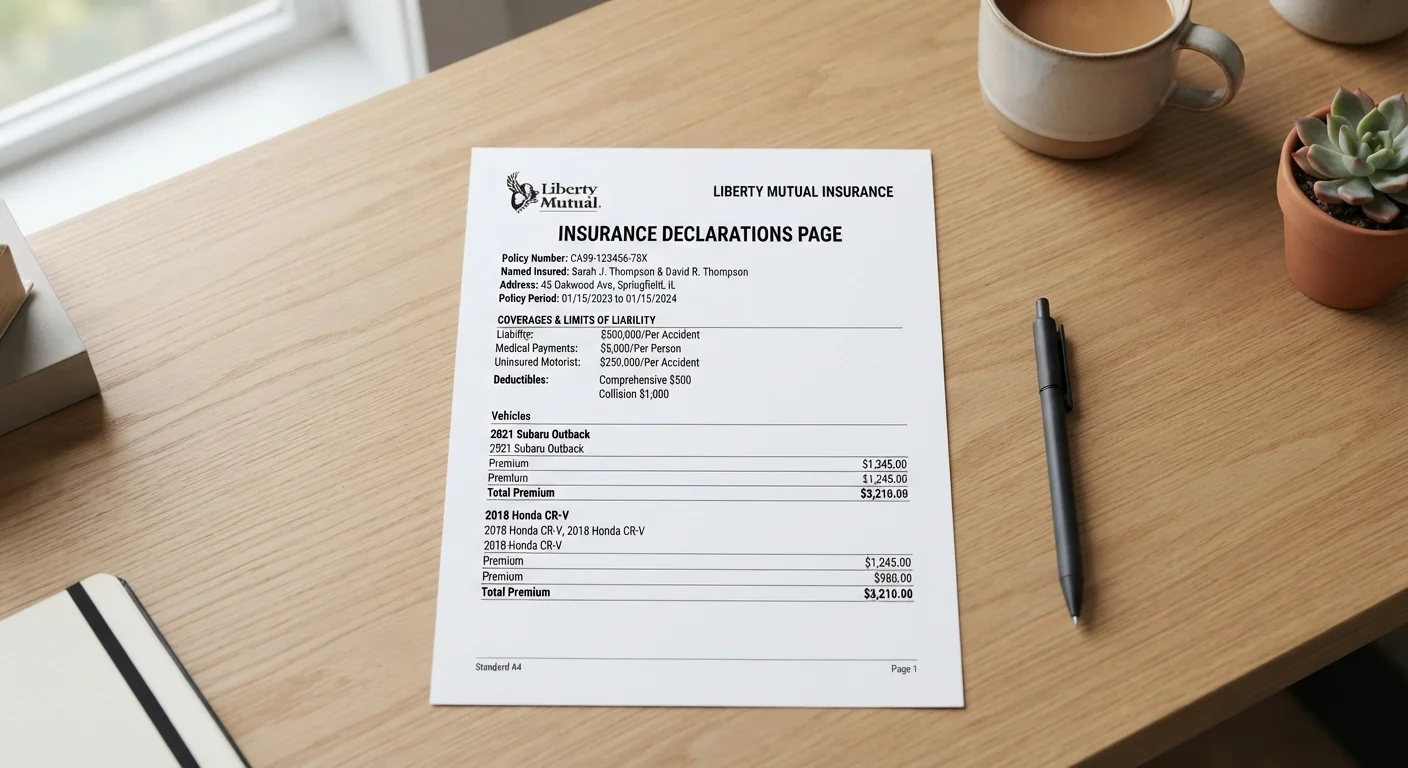
Every insurance policy comes with a declarations page — often called the "dec page" — a one- or two-page summary that condenses the essential terms of your coverage into a readable snapshot. Insurers are required to provide one, and it's typically the first document in your policy packet or the first page of a digital policy file.
Think of the declarations page as a table of contents and a summary rolled into one. It tells you who is covered, what is covered, how much the insurer will pay, and for how long. But it does not tell you everything — exclusions, definitions, and the specific conditions under which a claim will or won't be honored are spelled out in the full policy document. That distinction matters. As our guide to reading an insurance policy explains, the dec page is your starting point, not your finishing point.
If you're new to purchasing insurance on your own, the Insurance From Scratch guide provides useful context on how coverage decisions are made before a policy is even issued.
Your Current Declarations Page
The primary document you will verify and interpret through this process.
Full Policy Document
Referenced alongside the declarations page to understand exclusions and conditions not listed on the summary sheet.
Prior Year Declarations Page
Useful for comparing coverage changes, premium shifts, or removed endorsements at renewal.
Licensed Insurance Agent or Broker
Can clarify terms, correct errors, and explain coverage options specific to your policy and state.
How to Read Your Declarations Page Step by Step
The six steps below walk you through the key sections of a typical declarations page — what each one means and what to verify. While layouts differ slightly by insurer and coverage type, the core components are consistent across auto, home, renters, and most other personal lines policies.
What you will need
Locate the Named Insured and Policy Period
The top section of any declarations page lists the named insured — the person or entity the policy legally covers — and the policy period, the start and end dates of coverage. Confirm that your legal name is spelled correctly and that any co-insureds (such as a spouse or co-owner) are listed if they should be. Then check the policy period dates carefully: a lapse between an old and new policy — even by one day — can leave you unprotected.
Review the Property or Vehicle Description
Below the insured's name, you'll typically find a description of what is being covered — the insured property or vehicle. For home policies, this is the property address. For auto policies, it includes the year, make, model, and Vehicle Identification Number (VIN). For renters policies, it's the address of the rented dwelling. Confirm this matches your actual situation exactly. A wrong address or VIN can create complications if a claim arises.
Identify Each Coverage Type and Its Limit
The coverage section is the core of the declarations page. It lists each coverage type your policy includes and the maximum dollar amount your insurer will pay for a covered loss under that coverage — called the coverage limit. Common examples include:
- Dwelling coverage (home): the rebuild cost of the structure
- Liability coverage (home or auto): protection if you're responsible for injury or damage to others
- Collision / comprehensive (auto): damage to your own vehicle
- Personal property (renters or home): coverage for belongings
Verify that each limit reflects what you actually selected and that no coverage you intended to include is missing. For broader context on what these coverage types mean in practice, see the Coverage Types hub.
Check Your Deductible for Each Coverage
A deductible is the amount you pay out of pocket before your insurance coverage kicks in. Declarations pages often list separate deductibles for different coverage types — for example, a standard deductible for most losses and a higher hurricane or wind deductible for weather-related events. Make sure each deductible matches what you agreed to when setting up the policy. Higher deductibles lower your premium but increase your out-of-pocket cost at claim time.
Note Any Endorsements or Riders
Endorsements (sometimes called riders) are amendments that add, remove, or modify coverage beyond the standard policy. They are typically listed on the declarations page by name or form number. Common endorsements include scheduled personal property (for high-value items like jewelry), water backup coverage, or umbrella policy add-ons. If you added an endorsement specifically for extra protection, confirm it appears here. Missing endorsements mean missing coverage.
Confirm Your Premium and Payment Schedule
The declarations page states your premium — the total cost of the policy for the coverage period — along with how it's billed (monthly, semi-annually, or annually). Confirm the amount matches what you budgeted and check for any fees associated with installment payments. If the premium has changed significantly from the prior term, contact your insurer or agent for an explanation before assuming the change is an error.
Errors Can Affect Your Claims
If your declarations page lists incorrect information — an outdated address, a missing named insured, or the wrong coverage limit — your insurer may use that discrepancy during a claim. Always contact your agent or insurer promptly if you spot an error. Do not assume it will self-correct at renewal.
Scan at Every Renewal
Insurers can adjust coverage terms, limits, or premiums at renewal without a separate notification beyond what's on the new declarations page. Treat each renewal declarations page as a fresh document to review from scratch, not just a receipt confirming your old policy continued.
After You've Reviewed It: What to Do Next
Once you've worked through your declarations page, you're in a much stronger position to understand your actual coverage. If anything looks incorrect — a wrong limit, a missing endorsement, an outdated address — contact your insurer or licensed agent to request a corrected declarations page in writing. Do not rely on a verbal assurance that a correction will be made.
From here, consider going deeper. The Insurance Coverage Audit is a practical checklist for reviewing every policy you hold to spot gaps. And if you want to sharpen your understanding before making changes, our guide to clarifying your coverage needs walks through the right questions to ask before adjusting any policy.
Finally, if a claim is ever on the horizon, knowing your declarations page gives you a solid foundation for navigating the claims process. The Claims & Rights hub covers what happens after a loss and what your rights are as a policyholder. For a plain-language breakdown of the terms you'll encounter during a claim, see The Language of Insurance Claims glossary.
The Dec Page Is Not the Full Policy
The declarations page is a summary, not the complete contract. Exclusions, conditions, and definitions that govern what is and isn't covered live in the full policy document. Always read both. See our guide to what coverage actually means for a deeper look at how exclusions work.
This article provides general insurance education and is not personalized insurance, legal, or financial advice. Coverage terms, limits, exclusions, and regulations vary by insurer, policy type, and state. Always read your complete policy documents and consult a licensed insurance agent or adviser for guidance specific to your situation.